-

Bachelor's

-

Masters
-

MBA
-

Doctorate
-

Micro Credit
-

Explore all Courses
-
Postgraduate Certifications

-
Postgraduate Diploma
-
Undergraduate Diploma
-
Diploma



Top AI Tools for Students in 2026

Author: maharajan p
|9
MINS READ
| 0
| 354
Created On: 13 May, 2026
Share




Table of Contents (TOC):
- Introduction
- Key Takeaways
- Various Ways Students Can Use AI Tools
- Top 10 AI Tools for Students
- Level Up Your Skills with UniAthena
- FAQs
Introduction
Most students use AI the wrong way.
They open ChatGPT, paste a question, copy the answer, and call it done. Then they wonder why they’re still struggling before exams, still staring at a blank page before submissions, and still nervous before interviews.
The problem isn’t AI. It’s that nobody showed you how to actually use it.
There are AI tools for students built specifically for different needs, from learning complex concepts faster to building presentations and preparing for their first job interview.
Key Takeaways:
- Different tools serve different purposes: using free AI tools like ChatGPT for explanations or Gemini for real-world context depends on what you’re trying to solve.
- For exams, active recall matters more than reading: tools like Quizlet and Anki help you test and retain information effectively.
- AI can speed up output, but not replace skill: Whether it’s writing, projects, or presentations, your input still defines the quality.
- Tools support your workflow, but domain knowledge builds your career; structured learning and specialization are what actually move you forward.
Various Ways Students Can Use AI Tools
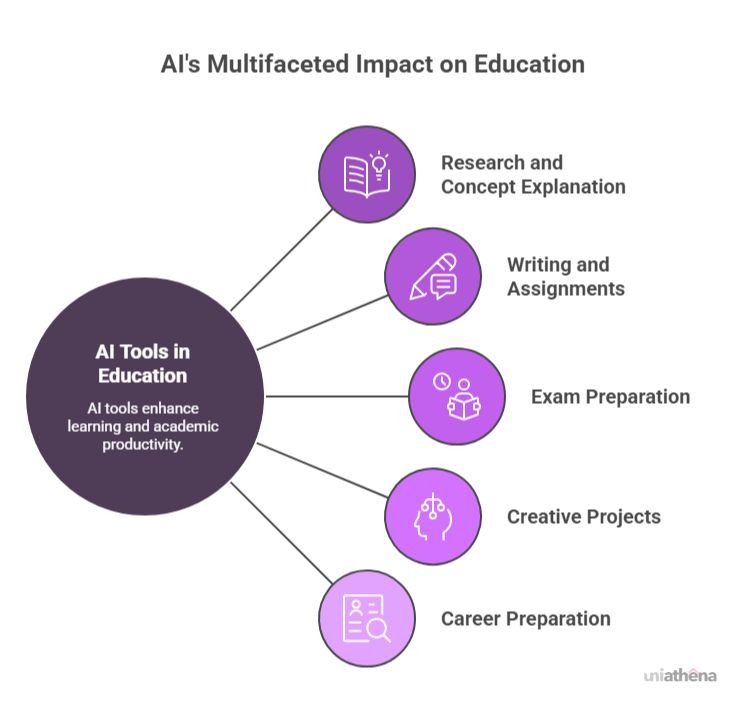
If you’ve ever searched for a quick explanation before an exam, struggled to structure an assignment, or rushed to finish a presentation the night before submission, you’re already facing the exact problems AI tools are built to solve.
Instead of using them randomly, you can apply them across your academic workflow in a few practical ways:
- Faster Research and Concept Explanation: Get instant breakdowns of complex topics without wading through endless search results.
- Help with Writing and Assignments: Draft, refine, and improve your work with real-time feedback on structure and clarity.
- Smarter Exam Preparation: Generate practice questions, summaries, and study guides tailored to your syllabus.
- Support for Creative Projects: Brainstorm ideas, overcome creative blocks, and explore new directions quickly.
- Assistance with Career Preparation: Polish your resume, prep for interviews, and research industries in minutes.
Top 10 AI Tools for Students
1. Understanding Lessons: AI Explains Complex Topics
When you’re stuck on a concept, repeating the same source won’t fix it. AI tools help you see the topic differently, making it easier to understand and move on.
1.1. ChatGPT
If a topic feels too complex, use ChatGPT to rework the explanation until it clicks. Instead of settling for one version, you can ask it to approach the same concept in different ways.
Try it on one of the hardest topics in your subject:
- Ask for analogy-based explanations (e.g., “Explain entropy like I’m 15”)
- Request step-by-step reasoning, not just the final answer
- Turn dense material into structured notes or simplified summaries
1.2. Gemini
When a concept makes sense in theory, but you’re not sure how it applies in the real world, use Gemini. It works like a bridge between textbook knowledge and current context, helping you connect what you learn with how it’s actually used.
Use it when you need to:
- See how a concept is applied in real-world scenarios, not just defined
- Validate facts or back your understanding with recent examples and case studies
- Combine inputs like PDFs, notes, or videos and get a clearer, context-rich explanation
2. Doing Assignments: AI Helps Structure Answers and Improve Writing
Whether it’s an assignment or a research paper, putting your ideas into a clear, structured format takes time. AI tools help you organize your thoughts and refine your writing faster.
2.1. Grammarly
Once your draft is ready, use Grammarly to clean up how it reads. It helps you fix small errors and improve how your ideas come across.
Use it when you need to:
- Correct grammar, punctuation, and sentence structure
- Improve clarity and tone in academic writing
- Polish essays and reports before submission
2.2. Notion AI
When your ideas feel scattered or unstructured, Notion AI helps you organize them into a clear flow. It’s useful at the starting stage, before the writing is fully done.
Use it when you need to:
- Turn rough ideas into a structured outline
- Organize notes into clear sections for assignments
- Summarize long material into key points you can use directly
3. Preparing for Exams: AI Creates Quizzes and Practice Tests
When you’re preparing for exams, passive reading doesn’t work. You need to test yourself repeatedly to see what you actually remember. AI tools help you turn your notes into active practice.
3.1. Quizlet
Quizlet is designed for fast conversion + active testing. Its newer AI features don’t just create flashcards, they analyze your material and turn it into multiple question types automatically.
Use it when you need to:
- Turn notes, PDFs, or slides into AI-generated flashcards and quizzes instantly
- Practice with adaptive test modes that adjust based on your answers
- Train with multiple formats (MCQs, fill-in-the-blank, written recall)
In addition to creating flashcards, Quizlet’s AI also extracts key concepts, generates different question styles, and groups them into study paths based on difficulty and topic relationships.
3.2. Anki
Anki is designed for long-term retention. It uses a spaced repetition algorithm that shows you information right before you’re about to forget it.
Use it when you need to:
- Retain information using card-level spaced repetition (not general review)
- Follow a system that schedules reviews exactly when you’re about to forget
- Build long-term memory for subjects with heavy content load
Anki tracks your performance on each individual card and adjusts review intervals from minutes to months, instead of using fixed schedules.
4. Completing Projects: AI Helps Create Videos, Slides, and Visuals
When you’re working on a project, presenting it visually is often the hardest part. Instead of building slides or videos from scratch, AI tools can take your raw idea and turn it into a ready-to-use presentation or explainer video.
4.1. Canva
Canva is an AI-powered project builder that can generate, edit, and even restructure your entire presentation from a prompt.
Use it when you need to:
- Generate full presentations with slides, content, and visuals from a single idea
- Turn text into images, videos, or infographics using AI prompts
- Convert one format into another (e.g., slides → document → poster) instantly
Canva’s Magic Design can create complete slide decks with structure and content in seconds, removing the “blank page” problem. Its newer features like Magic Switch can automatically transform your presentation into different formats (docs, summaries, translations) without rebuilding from scratch.
4.2. Runway ML
Runway is built specifically for AI video generation and editing. It’s one of the few tools where you can create videos from scratch using AI.
Use it when you need to:
- Generate videos using text prompts (text-to-video)
- Edit videos by removing backgrounds, objects, or changing scenes
- Create explainer or concept videos without filming anything
Runway’s Gen-2 model allows you to generate videos from text, images, or existing clips, meaning you don’t need raw footage to start.
5. Preparing for Jobs: AI Helps You Build Resumes and Practice Interviews
When you reach your final year, placements become a priority. Getting shortlisted depends on how well you present your experience on paper and how confidently you perform in interviews. AI tools can help you prepare both.
5.1. Kickresume
Final-year students usually have projects, internships, and coursework, but turning that into a proper resume is the hard part. Kickresume helps you build a structured resume without guessing what to write.
Use it when you need to:
- Create a complete resume draft quickly using AI suggestions
- Write clear bullet points for projects and internships
- Use ATS-friendly templates that follow standard hiring formats
It also gives pre-written examples for different roles, so you can model your resume based on what recruiters expect.
Also Read: Resume Writing 101: Expert Tips & Tricks (2026)
5.2. Interview Warmup (by Google)
Interview Warmup helps you practice answering interview questions out loud, so you can see how you actually sound, not just what you think you’re saying.
Use it when you need to:
- Practice answering real interview questions for your role
- See a transcript of your response and identify weak spots
- Improve by spotting repeated words, missing points, or vague answers
It doesn’t judge your answers, it shows patterns in how you respond. You can see if you’re repeating words, missing key points, or not using role-specific terms, and then refine your answer by trying again.
You’re not limited to just these tools. You can also use tools like ChatGPT, Gemini, or other AI assistants to prepare more deeply.
For example, you can:
- Collect interview questions from platforms like Glassdoor (candidate-reported questions) & LeetCode (for technical roles) and ask AI to identify frequently asked patterns
- Turn those into real interview scenarios and practice answering them
- Refine your answers until they sound clear, structured, and natural
In the end, it’s not about which tool you use, it’s about how effectively you use it to prepare.
Also Read: How to Handle Salary Negotiation During an Interview
Level Up Your Skills with UniAthena
AI tools can help you study faster, complete assignments, and prepare for interviews. But they only work well when you know what to ask and how to use them. Whether it’s ChatGPT, Canva, or a resume builder, the output depends on your input.
To move forward in your career, you need more than tools. You need strong subject knowledge and domain expertise.
That’s where UniAthena comes in.
UniAthena offers short programs designed to help you build in-demand skills across areas like artificial intelligence, machine learning, digital marketing, finance, and supply chain, aligned with current industry requirements.
👉 Explore short programs here
If you’re planning to specialize in a specific field, you can go beyond short courses and pursue full degree programs with UniAthena.
These programs are offered in collaboration with recognized universities such as Guglielmo Marconi University (GMU Italy), UCAM Spain, Abertay University, and Acacia University, ensuring your qualification carries strong academic credibility.
Along with your degree, you also receive additional certifications from globally recognized bodies like Cambridge International Qualifications (CIQ), Chartered Management Institute (CMI), and Scottish Qualifications Authority (SQA).
Here are some of the programs you can explore:
👉 Explore our Master’s and MBA programs to build expertise in your chosen domain.
FAQs
Q1. Can AI tools help with exam preparation?
A: Yes, they generate quizzes, flashcards, and practice tests to help you actively recall and assess your understanding.
Q2. Are AI tools allowed for academic assignments?
A: It depends on your institution, but they are generally allowed for research, structuring, and improving clarity—not direct copying.
Q3. Which AI tool is best for writing essays?
A: Tools like ChatGPT and Grammarly work well together for drafting, structuring, and refining essays with better clarity and accuracy.
Q4. Can AI help students prepare for job interviews?
A: Yes, AI tools provide practice questions, simulate responses, and help refine answers based on structure and commonly asked interview patterns.
Q5. What AI tools are useful for creating presentations?
A: Canva and similar tools help generate slides, visuals, and structured presentations quickly from basic input or raw ideas.
Q6. How should students use AI responsibly for learning?
A: Use AI to understand concepts, organize ideas, and practice, not to copy answers or bypass the actual learning process.
Explore Related Courses








.jpg)


COMMENTS(0)
Explore Related Courses
Our Popular Insights
Careers are shifting faster than ever, and staying relevant takes more than experience. Explore UniAthena’s most-read blogs for sharp insights, emerging skills, and practical pathways that help you move forward with clarity and confidence in a changing professional world.


How to Switch Career to Data Analytics?
Read More
6
mins read




How to Switch Career to Data Analytics?
Read more
6
mins read

Get in Touch

It’s Time to Start
Join NowMost Popular Online Specialization
- Master of International Business Administration
- Master of Business Administration
- MBA in General Management- FastTrack
- Master in Innovation and Entrepreneurship
- MBA-Family Business Management
- Master in Procurement and Contract Management
- Extended Diploma in Business Analytics (SCQF Level 11)
- Diploma in Supply Chain and Logistics Management (SCQF Level 11)
- Strategic Human Resource Management Practitioner
- Master in Data Science
- Master in Engineering Management
Trending Online
- Integrated Doctorate of Business Administration
- Postgraduate Certificate in Finance for Next Generation Managers
- Master of Business Administration- General Management (Fast Track)
- Postgraduate Certificate in Socio-Economic and Legal Framework
- Postgraduate Certificate in Business Sustainability
- Certified Manager
- Supply Chain Management Practitioner
- MBA - AI in Business
- MBA - Accounting & Finance
- Master in Supply Chain and Logistics Management
Top Universities Online Certificates
- Postgraduate Certificate in International Marketing Management
- Postgraduate Certificate In International Human Resource Management
- Postgraduate Certificate in Strategic Management
- Postgraduate Certificate in Procurement & Contracts Management
- Postgraduate Certificate in Business Analytics
- Postgraduate Certificate in Strategic Supply Chain & Logistics Management
- Postgraduate Certificate in Human Resource and Leadership
- Project Management Practitioner
- Postgraduate Certificate in Supply Chain Design & Implementation
- Postgraduate Certificate in Management Accounting and Finance
Accredited Online Degree Program
- MBA - Digital Transformation
- MBA - Family Business Management
- MBA - Marketing Management
- MBA in Quality Management
- MBA - Business Intelligence & Data Analytics
- MBA in Operations & Project Management
- MBA in Energy Management
- MBA In Construction & Safety Management
- Master in Organisational Leadership
- Master in Public Health
- Master in Construction Management
- Bachelor of Arts in Business Administration


 Install Now


UniAthena is an Ed-Tech, offering flexible, affordable learning solutions, including Free-Learning Upskilling Courses and Academic Programs in partnerships with accredited and globally renowned universities and professional qualification bodies.


Do you have any questions ?
Feel free to send us your questions or request a free consultation
Send a message
UK
Athena Global Education
Magdalen Centre,
Robert Robinson Avenue,
Oxford, OX4 4GA, UK
Phone : 01865 784299
MIDDLE EAST
Athena Global Education FZE
Block L-03, First Floor,
P O Box 519265, Sharjah Publishing City,
Free Zone, Sharjah, UAE
Phone : +971 55 879 5492
INDIA
Uniathena Private Limited
9A,Midas Tower
Phase 1
Hinjewadi Rajiv Gandhi Infotech Park
Pune-411057
Phone: +91 9145665544
All Copyrights Reserved @ Athena Global Education 2021-2026