-

Bachelor's

-

Masters
-

MBA
-

Doctorate
-

Micro Credit
-

Explore all Courses
-
Postgraduate Certifications

-
Postgraduate Diploma
-
Undergraduate Diploma
-
Diploma



What Developers Must Never Forget While Vibe Coding

Author: neha mondal
|6
MINS READ
| 0
| 133
Created On: 11 June, 2026
Share




Table of Contents (TOC):
- Introduction
- The Biggest Mistake
- Never Expose Secrets and API Keys
- Understand What Database the AI Created
- Add Limits Before Users Add Costs
- Security Is Not Optional, It's Your Responsibility
- Understand Your Backend and Your Dependencies
- Can You Maintain What the AI Built?
- Test the App Yourself. Actually Use It.
- Is Vibe Coding the Future?
- The Bottom Line
Introduction
A few years ago, building an application required carefully planning the architecture, writing code line by line, and spending days debugging small issues. With AI coding assistants, users can now type a couple of words and have an entire feature, Web page, API, or full application actually written for them. This new approach can be referred to as Vibe Coding, a type of coding where AI generates most of the implementation based on natural-language instructions rather than manual coding.
The appeal is obvious. Vibe Coding can significantly boost developer productivity by enabling them to build software faster than ever before, even with the help of AI. But speed comes with a hidden risk. If the AI is generating most of the code, it is easy to get carried away with simply making sure the app is functional and not realize that it is also unsafe, unreliable, and not maintainable.
Understanding what Vibe Coding is is easy. The challenge kicks in once the developers have to check what has to be done after the AI has created code.
The Biggest Mistake
One of the most common mistakes developers make while coding with AI is believing that if the application runs successfully, the job is finished.
AI can generate code that looks professional and functions correctly during testing. However, working code is not always secure code, scalable code, or maintainable code. A login page may appear perfect, but store passwords incorrectly. An API may return the expected data but expose sensitive information. A chatbot may answer questions accurately but create unexpected costs because usage limits were never implemented.
The first rule of development with AI is simple: never assume generated code is production-ready.
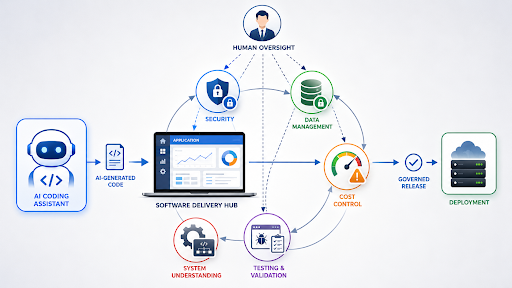
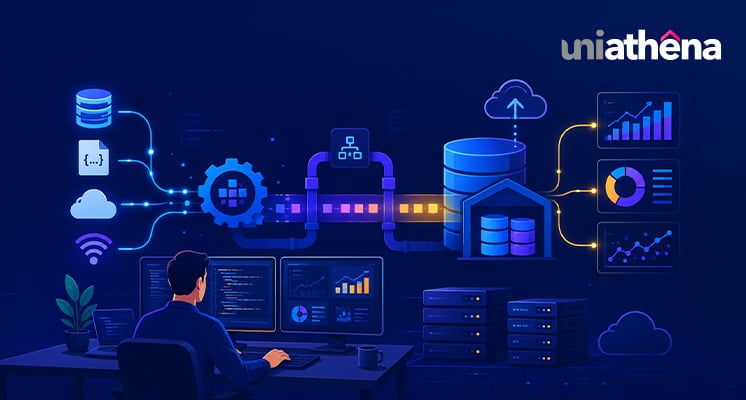
Fig: Human oversight and control layers for AI-assisted software development
Never Expose Secrets and API Keys
One of the most serious vibe coding security risks involves API keys, database credentials, and authentication tokens.
AI-generated applications sometimes place API keys directly inside the source code because it is the quickest way to make a feature work. While it's convenient during development. But the moment that code goes to GitHub or gets deployed, that key is exposed to the entire internet.
API keys should be stored in environment variables or secure configuration files rather than hardcoded into the application. Developers should always check where credentials are stored before deploying any AI-generated project. This is non-negotiable.
Many expensive mistakes happen because someone launched an application without realizing their API key was visible to everyone.
Understand What Database the AI Created
When AI generates an application, many users focus on the user interface and ignore the database behind it.
However, the database contains the application's most valuable asset, its data.
Developers should understand:
- What information is being stored
- Whether sensitive information is encrypted
- How user data is accessed
- Whether unnecessary information is being collected
AI may create database structures that technically work but are inefficient, insecure, or difficult to scale later. The AI won't warn you unless you ask. Open your database. Look at the tables. Read the queries. Don't just trust that it's fine because the app runs.
Add Limits Before Users Add Costs
Many modern applications integrate AI models for chat, image generation, document analysis, or automation.
A common oversight occurs when developers successfully connect an AI model but forget to control usage.
Imagine launching a chatbot that allows unlimited requests. A small number of users could generate thousands of API calls, creating unexpectedly large bills within days.
One of the most important best practices for Vibe Coding is implementing usage controls such as:
- Daily request limits
- Rate limiting
- Usage monitoring
- Spending alerts
- User quotas
Building the feature is only half the job. Managing the cost of that feature is equally important.
Security Is Not Optional, It's Your Responsibility
AI can create login systems surprisingly quickly. However, authentication and security are where most vibe-coded apps fall apart.
Ask questions such as:
- Can users access data that belongs to other users?
- Are passwords stored securely?
- Is account recovery protected?
- Are administrative functions restricted?
Many security incidents occur not because the application failed, but because access controls were poorly configured. This is why vibe coding security checks should always include a review of authentication and authorization settings.
AI tools are great at building features. They are not great at thinking like an attacker. Some things to actively check:
SQL Injection: If your app takes user input and puts it into a database query, is it sanitized? Unsanitized inputs let attackers delete or steal your entire database.
Authentication: Is your login system actually secure? Weak session tokens or missing logout functionality are common AI-generated oversights.
Authorization: Just because a user is logged in doesn't mean they should access everything. Can User A see User B's data? Test this yourself.
HTTPS: Make sure your deployed app uses HTTPS, not HTTP. This is basic but often overlooked.
Also Read: A 2.85× Leap in Real-Time AI Efficiency: The VL-JEPA Breakthrough
Understand Your Backend and Your Dependencies
You don't need to memorize every line of code the AI writes. But you should understand what it's doing, and more importantly, what it's using.
If your app has a login system, understand how sessions work. If it has payments, know what happens when a transaction fails. If it stores files, know where they go. And look at the packages your app is built on, are they actively maintained? Do they have known security issues? Are some of them not even necessary?
AI tools often pull in multiple libraries and third-party services to get things working fast. That's fine, but a dependency you don't understand is a risk you can't manage.
The good news? You don't have to figure this out alone. Just ask the AI itself. Highlight any piece of code and say: "Explain what this does, why it's here, and whether it's necessary." Most of the time, you'll get a clear, plain-language answer in seconds. This one habit alone can save you from a lot of confusion later.
Because when something breaks, and it will, you need to know where to look. Vibe coding can give you a car. But you still need to know how to steer it.
Can You Maintain What the AI Built?
Building an application is only the beginning. The real challenge often starts when something breaks, a feature needs to be changed, or the system needs to scale. If you don't understand the code, architecture, or dependencies that the AI generated, maintenance quickly becomes difficult. A useful rule is simple: if you cannot explain how a critical part of the application works, take time to understand it before deploying. AI can accelerate development, but long-term ownership still belongs to the developer.
Also Read: Generative AI vs. Prompt Engineering: Exploring Their Roles
Test the App Yourself. Actually Use It.
When AI builds something, it builds what it thinks you want. That's not always what you actually want.
Click every button. Try every form. Submit wrong inputs on purpose. Try to break it. Check it on mobile. Check it on different browsers.
AI-generated apps often have edge cases that only appear when a real human uses them. You are a real human. Don't skip this step.
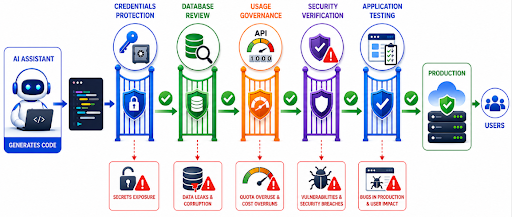
Fig: Validation pipeline for safely deploying AI-generated applications
Is Vibe Coding the Future?
Many people ask whether Vibe Coding is the future of software development. The answer is likely yes, but not in the way some expect.
The future isn't AI building everything alone. It's developers who combine AI's speed with their own judgment, oversight, and critical thinking.
Generating code is only the beginning. Reviewing, understanding, and improving it is what turns an idea into something real and reliable.
Also Read: How to Learn Coding from Scratch
The Bottom Line
Vibe coding is genuinely powerful. But speed means the important stuff, security, data handling, and cost control, can silently get left behind.
The best vibe coders aren't the fastest. They're the ones who know what to check before they ship.
AI is a brilliant assistant. But it doesn't know your users, your risks, or your responsibilities. You do. Keep the human in the loop.
Explore Related Courses











COMMENTS(0)
Explore Related Courses
Our Popular Insights
Careers are shifting faster than ever, and staying relevant takes more than experience. Explore UniAthena’s most-read blogs for sharp insights, emerging skills, and practical pathways that help you move forward with clarity and confidence in a changing professional world.







Get in Touch

It’s Time to Start
Join NowMost Popular Online Specialization
- Master of International Business Administration
- Master of Business Administration
- MBA in General Management- FastTrack
- Master in Innovation and Entrepreneurship
- MBA-Family Business Management
- Master in Procurement and Contract Management
- Extended Diploma in Business Analytics (SCQF Level 11)
- Diploma in Supply Chain and Logistics Management (SCQF Level 11)
- Strategic Human Resource Management Practitioner
- Master in Data Science
- Master in Engineering Management
Trending Online
- Integrated Doctorate of Business Administration
- Postgraduate Certificate in Finance for Next Generation Managers
- Master of Business Administration- General Management (Fast Track)
- Postgraduate Certificate in Socio-Economic and Legal Framework
- Postgraduate Certificate in Business Sustainability
- Certified Manager
- Supply Chain Management Practitioner
- MBA - AI in Business
- MBA - Accounting & Finance
- Master in Supply Chain and Logistics Management
Top Universities Online Certificates
- Postgraduate Certificate in International Marketing Management
- Postgraduate Certificate In International Human Resource Management
- Postgraduate Certificate in Strategic Management
- Postgraduate Certificate in Procurement & Contracts Management
- Postgraduate Certificate in Business Analytics
- Postgraduate Certificate in Strategic Supply Chain & Logistics Management
- Postgraduate Certificate in Human Resource and Leadership
- Project Management Practitioner
- Postgraduate Certificate in Supply Chain Design & Implementation
- Postgraduate Certificate in Management Accounting and Finance
Accredited Online Degree Program
- MBA - Digital Transformation
- MBA - Family Business Management
- MBA - Marketing Management
- MBA in Quality Management
- MBA - Business Intelligence & Data Analytics
- MBA in Operations & Project Management
- MBA in Energy Management
- MBA In Construction & Safety Management
- Master in Organisational Leadership
- Master in Public Health
- Master in Construction Management
- Bachelor of Arts in Business Administration


 Install Now


UniAthena is an Ed-Tech, offering flexible, affordable learning solutions, including Free-Learning Upskilling Courses and Academic Programs in partnerships with accredited and globally renowned universities and professional qualification bodies.


Do you have any questions ?
Feel free to send us your questions or request a free consultation
Send a message
UK
Athena Global Education
Magdalen Centre,
Robert Robinson Avenue,
Oxford, OX4 4GA, UK
Phone : 01865 784299
MIDDLE EAST
Athena Global Education FZE
Block L-03, First Floor,
P O Box 519265, Sharjah Publishing City,
Free Zone, Sharjah, UAE
Phone : +971 55 879 5492
INDIA
Uniathena Private Limited
9A,Midas Tower
Phase 1
Hinjewadi Rajiv Gandhi Infotech Park
Pune-411057
Phone: +91 9145665544
All Copyrights Reserved @ Athena Global Education 2021-2026