-

Bachelor's

-

Masters
-

MBA
-

Doctorate
-

Micro Credit
-

Explore all Courses
-
Postgraduate Certifications

-
Postgraduate Diploma
-
Undergraduate Diploma
-
Diploma



Inside AI-Driven Cybersecurity: How Modern Threats Are Detected in Real Time
Author: malik basit ahmad
|5
MINS READ
| 0
| 152
Created On: 05 January, 2026
Share




Table of Contents (TOC):
1. Introduction
2. Key Takeaways
3. What Today’s Cyber Threats Really Look Like
4. Why Traditional Security Isn’t Enough Anymore
5. How AI-Driven Threat Detection Works
6. Real-World Examples (E-E-A-T Case Studies)
7. Tools Leading the Future of Cloud Security
- Microsoft Defender
- CrowdStrike Falcon
8. How Automated Detection & Response Works
9. Best Practices to Prevent Cyber Threats
10. Conclusion
11. FAQs
Introduction
Cloud technology has become the backbone of modern operations. However, along with its advantages comes a growing risk, as cybercriminals are becoming more sophisticated. Traditional monitoring methods can’t keep up with automated attacks, credential stealing, and zero-day exploits.
That’s why businesses are now moving towards automated cybersecurity threat detection and AI-driven threat detection systems. These systems can spot unusual activity, detect threats in real time, and take immediate action, often before people even notice that something is wrong.
Key Takeaways:
- Modern attacks are automated, making manual monitoring insufficient and slow.
- AI-driven threat detection provides faster, more accurate security insights and responses.
- Tools like Microsoft Defender and CrowdStrike Falcon are leading next-generation cloud security.
- Automated cybersecurity detection and response help organizations react faster and minimize damage.
- A strong cybersecurity strategy includes prevention, automation, training, and continuous monitoring.
What Today’s Cyber Threats Really Look Like
Cyber threats today are more targeted and strategic than ever. Instead of random virus outbreaks, attackers now use automation and AI to exploit vulnerabilities at scale.
Why Traditional Security isn’t Enough Anymore
- Cyberattacks now happen at machine speed. A breach can occur, spread, and exfiltrate data in minutes—not hours.
- Research from IBM shows organizations with automated cybersecurity systems reduce breach costs by over 65% and resolve incidents 80% faster.
- Manual log reviews and legacy antivirus can’t match the speed and complexity of modern attack methods, especially in multi-cloud environments.
How AI-Driven Threat Detection Works
AI-powered cybersecurity goes beyond simple scanning. It continuously learns from behavior patterns and global threat intelligence.
Key capabilities include:
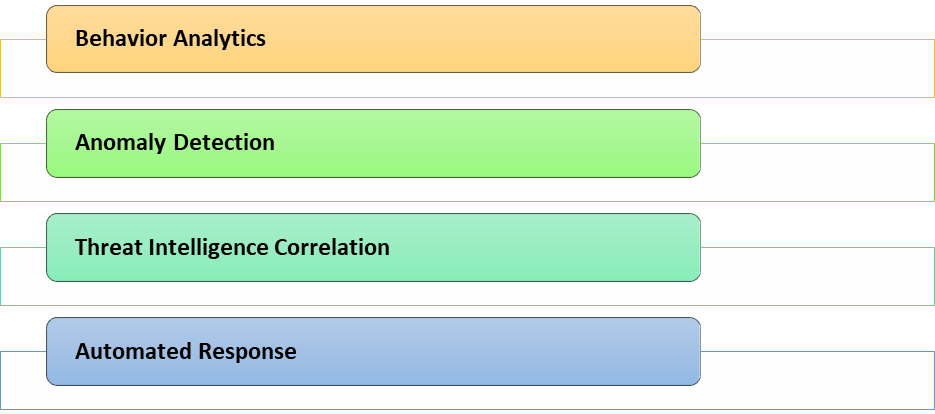
- Behavior Analytics: Detects unusual account behavior or access patterns.
- Anomaly Detection: Flags deviations from normal network traffic or identity usage.
- Threat Intelligence Correlation: Compares activity against known attack patterns.
- Automated Response: Automatically isolates systems, blocks accounts, or alerts analysts.
The result? Faster detection, reduced damage, and stronger cybersecurity threat prevention.
Real-World Case Studies: Automated Threat Detection in Action
To make this more tangible, here are two real examples showing how automated response helps prevent cyberattacks.
Case Study 1: Microsoft Defender Stops a Ransomware Attack
A global manufacturing company noticed suspicious login attempts from multiple countries. Traditional tools didn’t detect anything unusual because credentials were technically valid.
However, Microsoft Defender for Cloud Apps flagged:
- Impossible travel sign-ins
- Unusual access behavior
- Attempts to escalate privileges
Using Microsoft Defender Threat Intelligence, the activity was linked to the BlackCat ransomware group.
Automated responses kicked in:
✔ Account temporarily disabled
✔ Virtual machines isolated
✔ Malicious IPs blocked
Outcome: No data loss — threat contained in under 20 minutes.
Case Study 2: CrowdStrike Falcon Protects a Financial Institution
A financial services firm detected irregular API traffic that suggested credential harvesting.
Using CrowdStrike Falcon Cloud Security, the system:
- Analyzed API behavior
- Cross-referenced patterns with known FIN7 activity
- Blocked the malicious connection
Falcon automatically:
✔ Terminated malicious processes
✔ Blocked suspicious tokens
✔ Alerted security teams
Outcome: No system downtime — breach prevented proactively.
Supporting Industry Insights
- The Ponemon Institute reports that organizations using AI in cybersecurity significantly improve threat detection and response efficiency.
- Gartner forecasts that by 2026, 70% of cloud security decisions will be automated.
- AI-driven systems help organizations save an average of $3.05M per breach.
Tools Leading the Future of Cloud Threat Detection
🔹 Microsoft Defender Security Suit
🔹 CrowdStrike Falcon Platform
Known for high-speed detection and accuracy, CrowdStrike offers:
- CrowdStrike Falcon Cybersecurity (Endpoint protection)
- CrowdStrike Falcon Threat Intelligence (Threat actor insights)
- CrowdStrike Falcon Cloud Security (Workload & identity protection)
How Automated Detection & Response Works
Most organizations follow a similar cycle:
1.Detect: Identify suspicious patterns
2.Analyze: Correlate with known or predicted threats
3.Respond: Isolate, block, alert, or shut down connections
4.Recover: Restore normal operations
5.Improve: Learn from the event for future prevention
Automation turns hours of work into seconds.
Best Practices to Prevent Cyber Threats
- Use MFA and identity protection tools
- Apply Zero Trust security principles
- Automate monitoring, logging, and patching
- Encrypt sensitive data
- Train employees on phishing and cyber hygiene
- Regularly audit cloud configurations
Conclusion
Cybersecurity is no longer passive—it must be intelligent, automated, and proactive. AI-driven threat detection helps organizations stay ahead of evolving cyberattacks, improving response time, reducing risk, and strengthening resilience.
Solutions like Microsoft Defender and CrowdStrike Falcon demonstrate how automation and intelligence are shaping the future of next-generation cloud security.
FAQs
Q1. What are the four common methods of threat detection?
A: Signature-based detection, anomaly detection, behavioral analytics, and machine learning–based detection.
Q2. How does cloud threat detection work?
A: It uses AI, logs, telemetry, and behavioral analytics to detect suspicious activity across cloud workloads and identities.
Q3. Is automated detection replacing cybersecurity teams?
A: No—automation handles repetitive tasks while humans manage strategy, decision-making, and escalation.
Q4. How can organizations prevent cyber threats?
A: By using automated tools, Zero Trust frameworks, regular patching, MFA, and security awareness training.
Q5. Why is AI important in cybersecurity?
A: Because AI detects unknown, fast-changing threats that traditional tools miss.
Explore Related Courses











COMMENTS(0)
Explore Related Courses
Our Popular Insights
Careers are shifting faster than ever, and staying relevant takes more than experience. Explore UniAthena’s most-read blogs for sharp insights, emerging skills, and practical pathways that help you move forward with clarity and confidence in a changing professional world.


What Is Grok AI?
Read More
9
mins read

🌟 Top Project Performer – June 2026 🌟
Read More
1
mins read


🌟 Top Project Performer – May 2026 🌟
Read More
1
mins read

Top Cybersecurity Courses in Ghana
Read More
7
mins read
Best AI Tools for Content Creation
Read More
8
mins read

🌟 Top Project Performer – April 2026 🌟
Read More
1
mins read
What Is Grok AI?
Read more
9
mins read
🌟 Top Project Performer – June 2026 🌟
Read more
1
mins read
🌟 Top Project Performer – May 2026 🌟
Read more
1
mins read
Top Cybersecurity Courses in Ghana
Read more
7
mins read
Best AI Tools for Content Creation
Read more
8
mins read
🌟 Top Project Performer – April 2026 🌟
Read more
1
mins read
Get in Touch

It’s Time to Start
Join NowMost Popular Online Specialization
- Master of International Business Administration
- Master of Business Administration
- MBA in General Management- FastTrack
- Master in Innovation and Entrepreneurship
- MBA-Family Business Management
- Master in Procurement and Contract Management
- Extended Diploma in Business Analytics (SCQF Level 11)
- Diploma in Supply Chain and Logistics Management (SCQF Level 11)
- Strategic Human Resource Management Practitioner
- Master in Data Science
- Master in Engineering Management
Trending Online
- Integrated Doctorate of Business Administration
- Postgraduate Certificate in Finance for Next Generation Managers
- Master of Business Administration- General Management (Fast Track)
- Postgraduate Certificate in Socio-Economic and Legal Framework
- Postgraduate Certificate in Business Sustainability
- Certified Manager
- Supply Chain Management Practitioner
- MBA - AI in Business
- MBA - Accounting & Finance
- Master in Supply Chain and Logistics Management
Top Universities Online Certificates
- Postgraduate Certificate in International Marketing Management
- Postgraduate Certificate In International Human Resource Management
- Postgraduate Certificate in Strategic Management
- Postgraduate Certificate in Procurement & Contracts Management
- Postgraduate Certificate in Business Analytics
- Postgraduate Certificate in Strategic Supply Chain & Logistics Management
- Postgraduate Certificate in Human Resource and Leadership
- Project Management Practitioner
- Postgraduate Certificate in Supply Chain Design & Implementation
- Postgraduate Certificate in Management Accounting and Finance
Accredited Online Degree Program
- MBA - Digital Transformation
- MBA - Family Business Management
- MBA - Marketing Management
- MBA in Quality Management
- MBA - Business Intelligence & Data Analytics
- MBA in Operations & Project Management
- MBA in Energy Management
- MBA In Construction & Safety Management
- Master in Organisational Leadership
- Master in Public Health
- Master in Construction Management
- Bachelor of Arts in Business Administration


 Install Now


UniAthena is an Ed-Tech, offering flexible, affordable learning solutions, including Free-Learning Upskilling Courses and Academic Programs in partnerships with accredited and globally renowned universities and professional qualification bodies.


Do you have any questions ?
Feel free to send us your questions or request a free consultation
Send a message
UK
Athena Global Education
Magdalen Centre,
Robert Robinson Avenue,
Oxford, OX4 4GA, UK
Phone : 01865 784299
MIDDLE EAST
Athena Global Education FZE
Block L-03, First Floor,
P O Box 519265, Sharjah Publishing City,
Free Zone, Sharjah, UAE
Phone : +971 55 879 5492
INDIA
Uniathena Private Limited
9A,Midas Tower
Phase 1
Hinjewadi Rajiv Gandhi Infotech Park
Pune-411057
Phone: +91 9145665544
All Copyrights Reserved @ Athena Global Education 2021-2026